
Invoice Maker & Estimating App
JobFLEXBusiness
3.4489.00 Reviews
- Version
- 8.3.3
- Installs
- 100.00K
- Age Rating
- Everyone
Screenshots
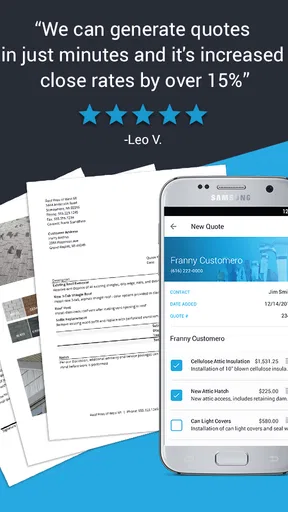
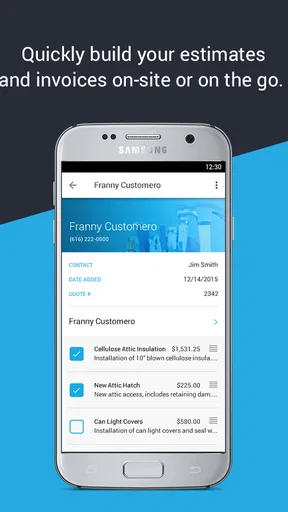
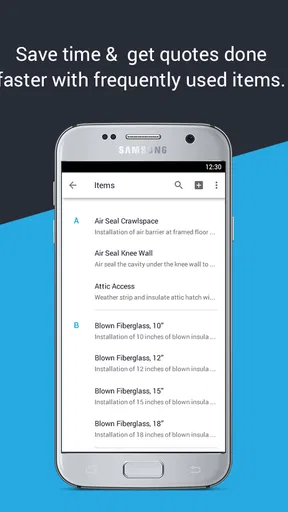
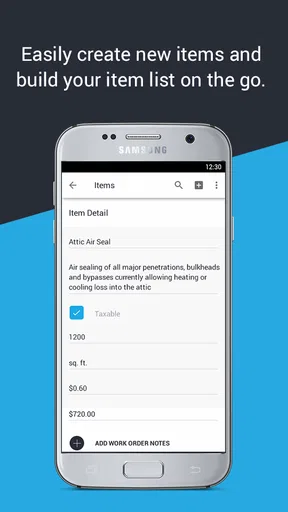
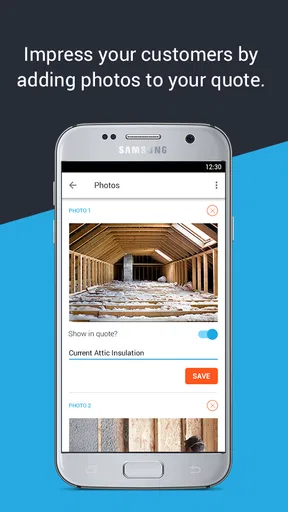
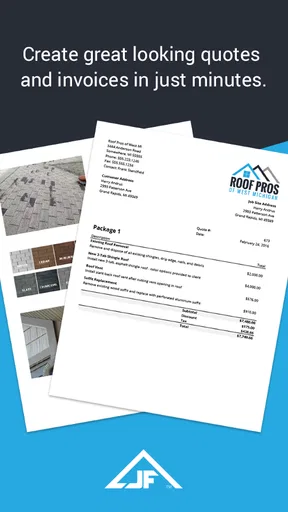

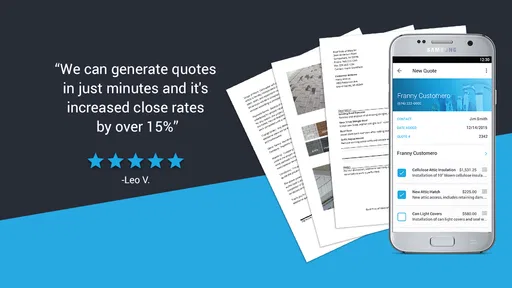
Our Review of Invoice Maker & Estimating App
 Analysis by Appyee
When I picture the kind of person who needs Invoice Maker & Estimating App, I do not imagine a finance department. I imagine a contractor finishing a small job, standing beside a customer’s driveway, and realizing that the estimate or invoice still has to be prepared before the day gets away. That is where this business app from JobFLEX makes sense: it is built around getting practical paperwork ready while you are away from a desk.
I spent time looking at it as an everyday tool rather than as a replacement for full accounting software. The experience is focused on invoices and estimates, so the appeal is easy to understand. You can keep the customer-facing part of a job moving without opening a complicated desktop system. Its real strength is reducing the gap between finishing work and sending a professional-looking document.
There is also a useful distinction to keep in mind. This is not simply a calculator with an invoice screen, and it is not an all-purpose business suite either. It sits between handwritten paperwork and more demanding accounting platforms. For a small operator who needs a repeatable way to turn job details into an estimate or bill, that middle ground can be valuable. For someone managing advanced bookkeeping, inventory, payroll, or detailed financial reporting, the narrower focus may become a limitation.
From job details to a document the customer can use
I find the most useful question here is what happens between agreeing on the work and handing the customer a clear record. This section looks at how I would turn job details into an estimate or invoice without letting a mobile shortcut obscure the scope, and it sets up the next part: how those documents fit into a shared household device or a small team’s routine.
Starting with the situation on the ground
The most convincing use case is a mobile one. Suppose I have completed a repair, installation, cleaning visit, or other contracted task. I need to capture what was done, show the customer what it costs, and leave a clear record for the next step. With a conventional office workflow, I might write notes first, remember the details later, and prepare the document at night. That delay creates opportunities for missed materials, unclear descriptions, and awkward follow-up.
This app is designed for the point where those details are still fresh. I can think through the job as a list of work and charges instead of trying to reconstruct it from memory. That changes the quality of the final document. A short description such as “replace damaged fitting” is more useful when entered immediately than when typed hours later from a vague note.
I would recommend preparing the basic business information before relying on the app during a busy day. A mobile workflow is only quick when the repeated parts are already under control. If I have to re-enter the same identity details or hesitate over how each service should be described, the advantage of working on the go is reduced. The app is most effective when it becomes the final step in a routine, not the place where I invent the routine.
That is an important practical insight: the quality of an invoice depends as much on preparation as on the screen used to create it. I would first decide on consistent names for common services, materials, and labor entries. Then, when I am at a customer’s location, I can concentrate on the unusual details of that particular job. This makes the document easier for the customer to understand and easier for me to review before sending it.
Building an estimate before the work begins
The estimate side is useful when the customer needs a clear proposal rather than a final demand for payment. I like the separation in principle because it supports a sensible conversation: describe the planned work, show the expected charges, and let the customer decide before the job is treated as complete. That is more professional than giving a rough verbal figure and hoping both sides remember the same number.
For a small contractor, an estimate can also act as a checklist. Before I commit to the work, I can break the project into the services and materials that explain the total. This is one of the less obvious benefits of using a dedicated estimating tool: writing the estimate forces me to notice what I may otherwise overlook. If the result feels too vague, that is a warning that the job itself may not yet be fully defined.
I would avoid treating the estimate as a promise that cannot change. Real jobs uncover damaged parts, access problems, or customer requests. The app can help present the initial plan, but the human handoff still matters. If the scope changes, I would create a clear updated document or explain the change directly rather than assuming the original estimate speaks for itself.
That workflow is especially helpful for small jobs where a large business system would feel excessive. I can prepare a straightforward estimate at the kitchen table, in a vehicle between appointments, or while discussing the work with a customer. The trade-off is that the app does not remove the need for judgment. It helps organize the proposal; it does not decide whether the proposed labor, materials, or terms are sensible.
Turning completed work into an invoice
Once the work is finished, the process changes from planning to documenting the outcome. This is where I would be careful to review every line rather than simply converting the estimate without thought. The final invoice should reflect what actually happened, including any approved changes. A quick mobile workflow is helpful, but speed should not become an excuse for sending an inaccurate bill.
My preferred routine would be to pause for a short review: compare the original scope with the completed work, check quantities, make sure the customer description is understandable, and confirm that the total matches the intended charge. This small pause is one of the best ways to avoid a second round of messages. It is also where a mobile invoice maker proves whether it is genuinely useful. If the review is easy, I can finish the administrative task while the job is still fresh.
The app’s free entry point makes it approachable for someone testing a new workflow. It is listed as free, while optional in-app purchases range from around eight dollars to around ninety dollars per item. I would therefore treat the free download as a chance to evaluate the process rather than assume every capability is included without cost. A contractor should check which parts of the workflow are available at the level they need before making it central to billing.
That pricing structure creates a practical decision. If I only prepare occasional documents, paying for additional capacity or tools may not be worthwhile. If the app saves repeated evening admin work and produces documents I am comfortable handing to customers, the cost can be easier to justify. The right question is not whether it is cheaper than doing nothing; it is whether it replaces enough manual effort to earn a place in the business routine.
Handling the handoff to the customer
An invoice is not finished when I have typed the last line. It becomes useful when the customer receives a document they can understand and act on. That handoff is where clarity matters most. A customer should be able to tell what work was performed, what charges relate to that work, and what they are expected to do next.
I would read the document as if I had never spoken to the contractor. That catches a common problem with small-business billing: the person who created the invoice knows the whole story, but the recipient sees only shorthand. A concise service description is better than an internal abbreviation. If materials and labor need separate explanation, I would keep them visibly distinct instead of hiding everything in one unexplained total.
This is also why I would not compare the app only with handwritten invoices. A paper note can be faster for one isolated transaction, but it is harder to keep consistent and easier to misplace. A standard digital workflow encourages me to use the same structure each time. That consistency helps customers recognize my documents and helps me answer questions later without relying entirely on memory.
At the same time, I would not expect this app alone to solve every communication issue. The customer may still ask for a revision, a different description, or clarification about an estimate. The tool supports the document exchange, but the handoff remains a conversation between two people. For a business that needs a complete customer relationship system with extensive messaging, scheduling, and account history, a broader platform may be a better fit.
What the finished result feels like
The outcome I want is simple: a contractor can leave a job with a clear estimate or invoice prepared while the facts are still fresh. That can improve responsiveness and reduce the pile of paperwork waiting at home. It also gives the business owner a more deliberate way to explain charges, which is valuable even when the job itself is small.
In my view, the app is strongest when the work has a clear beginning and end. A service call, a repair, a maintenance visit, or a defined installation can move naturally from notes to estimate to invoice. The workflow is easier to understand because each document corresponds to a real stage of the job. I would be less enthusiastic about using it as the central record for a complex project with many teams, long-running changes, or extensive purchasing requirements.
Another useful result is improved discipline. When I know I will create a document immediately after the job, I am more likely to record the relevant details before leaving. That habit can reduce forgotten extras and make later bookkeeping less mysterious. It is not a dramatic feature, but it is the kind of operational improvement that can matter more than a flashy interface.
JobFLEX has kept the app focused enough to appeal to mobile contractors and small businesses. Its presence on the platform is established, with over one hundred thousand installs, and the app is rated around three and a half stars from roughly one thousand ratings. I read that combination as a reason to approach it with realistic expectations: many people find the concept useful, but the experience is not universally effortless.
Where the workflow can break
The first friction point is entering information under pressure. A customer may be waiting, tools may still be in the vehicle, and the job may have taken an unexpected turn. If creating the document requires too much concentration, I might postpone it and lose the very advantage the app is meant to provide. My workaround would be to capture the essential facts first, then polish the wording before sending anything.
The second risk is overconfidence in a mobile invoice. A document can look organized while still containing the wrong quantity, an omitted charge, or a description that does not match the agreement. I would always compare the finished invoice with the estimate and my job notes. The app makes the administrative step more convenient, but it cannot verify whether I measured the room correctly or remembered the replacement part.
There is also a scale issue. A sole trader or small crew may appreciate a focused invoice maker, while a growing company may quickly want deeper controls. If several people need to coordinate estimates, revisions, approvals, and financial records, I would compare this app with full accounting or field-service software before committing. Those alternatives are usually heavier to learn, but their broader structure can be worth it when the business has outgrown one-person billing.
Another trade-off concerns the optional purchases. A free download lowers the barrier to trying the app, but the range of paid items means I would not build a workflow around assumptions about premium access. I would test the exact path I need: create the document, review it, and complete the handoff. If that path depends on an upgrade, I would decide based on the number of jobs I handle and the time saved rather than on the download price alone.
The age rating of Everyone also fits the app’s straightforward business purpose, and its minimum operating requirement reaches back to Android 4.1. That broad compatibility can help people using older devices, although I would still judge the experience on the phone I actually carry. A technically compatible app is not automatically comfortable on every screen size or under every working condition.
Small workflow choices that make it more useful
I would use estimates as a conversation aid, not just as a total. Before showing the customer the final figure, I would make sure each major part of the work has a plain-language explanation. This reduces the chance that a customer approves a number without understanding the scope. It also gives me a better reference if the job changes later.
I would create the invoice immediately after taking a final look at the work, but I would not rush the customer-facing wording. My practical compromise is to record the charges while I am still on site, then review the document once more in a quieter moment. That preserves accuracy without making the customer wait while I compose perfect sentences.
I would also treat the app as one part of a record-keeping routine. After the customer receives the document, I would keep my own notes aligned with it and avoid relying on the invoice as the only memory of the job. This matters when a customer returns months later with a question. A clear invoice helps, but a clear internal habit is what makes the answer quick.
Finally, I would test the complete path before using it on a real customer. I would prepare a sample estimate, turn it into a sample invoice, inspect the wording, and confirm that the result looks right on the device I use. This is a better test than simply opening the app and deciding that the idea seems convenient. The important test is the entire handoff, not the first screen.
Who should use it, and who should look elsewhere
I see this as a good match for independent contractors, tradespeople, mobile service providers, and small operators who need estimates and invoices without carrying a laptop. It is especially appealing when the business owner is also the person doing the work, selling the job, and collecting payment. In that situation, every avoided administrative detour has a noticeable effect on the day.
I would recommend trying it if your current alternative is a notebook, a blank document, or an invoice prepared from memory at the end of the week. The focused workflow can bring more consistency without forcing you into a large accounting system. It is also a reasonable starting point for a new small business that wants to present charges more clearly from the beginning.
I would skip it, or at least compare it carefully with a broader service, if I needed payroll, inventory management, advanced tax reporting, detailed receivables, or coordinated work across a larger team. Those needs can turn a simple invoice tool into an incomplete foundation. In that case, a full accounting package or field-service system may require more setup but provide a better long-term home for the business.
My recommendation after following the workflow
Invoice Maker & Estimating App is most convincing when I judge it by a specific promise: help a contractor move from completed work to a clear customer document without waiting for office time. It does that conceptually well, and the mobile focus is more meaningful than a generic claim about convenience. The app gives small businesses a structured place to prepare estimates and invoices at the moment those documents are needed.
My recommendation is positive for the right user, with one condition: test the complete workflow before depending on it. Create a realistic estimate, account for a change in scope, review the invoice, and consider how the customer will receive and understand it. If that process feels natural and the available purchase level suits the business, the app can replace a surprisingly large amount of improvised paperwork.
It is not the tool I would choose for complex financial administration, and I would not confuse a neat invoice with complete business accounting. But for a contractor who wants a practical bridge between the job site and the customer’s inbox or hands, it is a sensible option to explore. The current version is 8.3.3, and the app remains free to start, making a hands-on trial the most sensible way to decide whether its focused approach fits the way you actually work.
Verdict
Strengths of Invoice Maker & Estimating App
- Create professional invoices and estimates directly from your phone.
- Customizable templates help keep documents aligned with your brand.
- Track invoice status and outstanding payments in one place.
- Useful for freelancers and small businesses working away from a desk.
- Quick sharing makes sending invoices to clients simple and convenient.
Limitations of Invoice Maker & Estimating App
- Some advanced features may require a paid subscription.
- The mobile interface can feel crowded on smaller screens.
- Payment tracking may depend on supported payment integrations.
- Limited customization compared with full desktop accounting software.
- Frequent invoicing can require manual data entry without saved client details.
Similar Picks in This Category
View All
LinkedIn: Community & Network
LinkedIn3.8

Zoom Workplace
zoom.com4.1

Microsoft Teams
Microsoft Corporation4.6

Meta Business Suite
Meta Platforms, Inc.4.6

Webex Meetings
Cisco Systems, Inc.4.5

TeamViewer Remote Control
TeamViewer4.4
Frequently Asked Questions
What is Invoice Maker & Estimating App used for?
Invoice Maker & Estimating App is designed for freelancers, contractors, small businesses, and independent professionals who need to create estimates, invoices, receipts, and related business documents from a mobile device. After testing its workflow, I found it particularly useful for preparing professional-looking documents quickly, tracking basic payment details, and sending invoices to customers without relying on complicated accounting software.
Can I customize invoices and estimates in Invoice Maker & Estimating App?
Yes, the app generally allows users to add business information, customer details, products or services, prices, taxes, discounts, notes, and payment terms. Depending on the available version and plan, you may also be able to adjust branding elements such as a company name or logo. It is worth reviewing the template and customization options before downloading if your business requires highly specific layouts or advanced invoice design controls.
Does Invoice Maker & Estimating App support payments and expense tracking?
The app is mainly focused on creating and managing estimates and invoices, while payment and expense features can vary according to the version installed, subscription level, and device platform. You can usually record invoice status or payment information, but this does not necessarily mean the app processes payments directly. Users should check supported payment gateways, expense tools, and accounting integrations before depending on it for complete financial management.
Is Invoice Maker & Estimating App free to download?
Invoice Maker & Estimating App may be available as a free download, but some useful features can be restricted by in-app purchases or a subscription. Limits may apply to the number of invoices, templates, saved clients, exports, branding options, cloud features, or removal of advertisements. Before creating a large set of business records, review the pricing page and trial conditions carefully so you understand recurring charges and cancellation requirements.
Is my business and customer information safe in the app?
Because invoice applications can contain names, addresses, phone numbers, financial amounts, and business information, privacy and security should be considered before use. Check whether the app offers account protection, encrypted storage, backups, and secure sharing options. You should also read its privacy policy to understand how information is collected and stored. Avoid entering sensitive data until you are comfortable with the app’s permissions and security practices.
